
Documentation Assistance Window @Infinigence AI

Overview
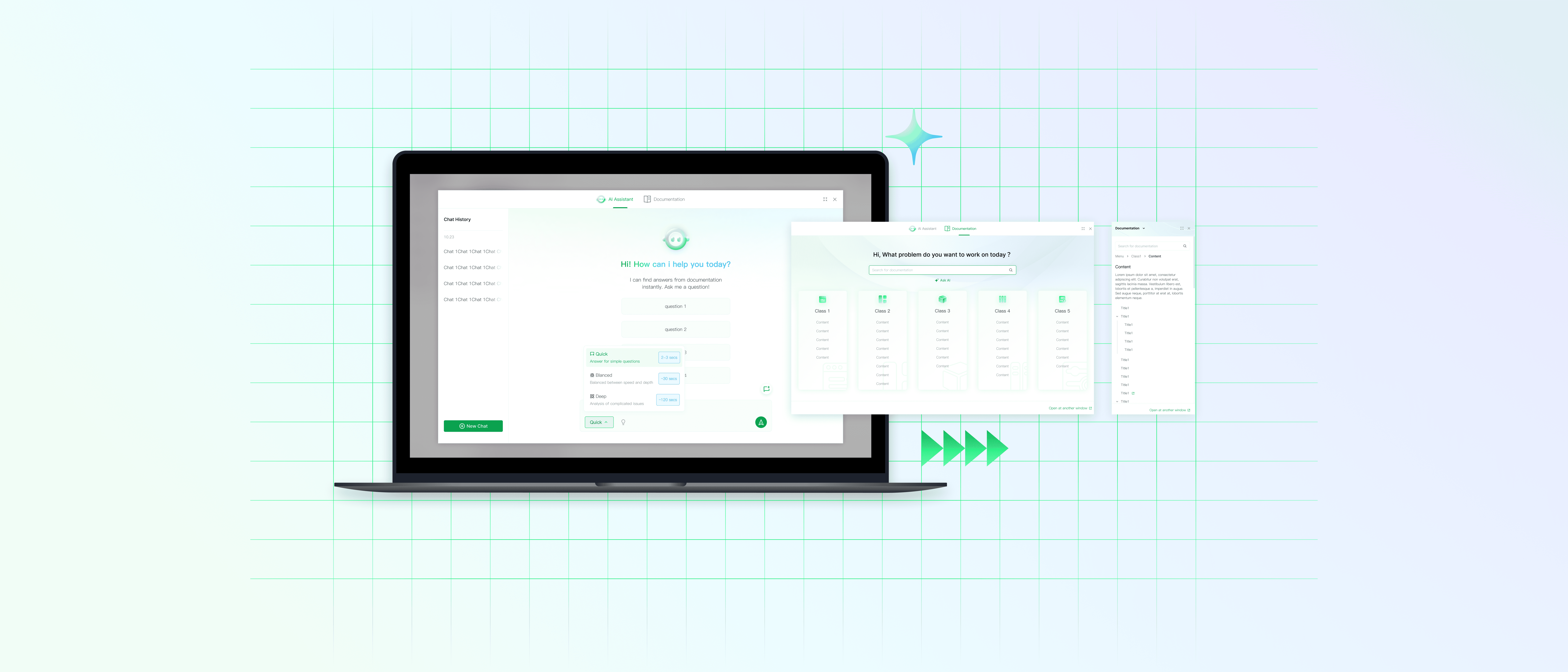
An ai-powered documentation assistance window that enables a more efficient and intuitive learning and search experience for users.
Timeline
05.2025-07.2025
Role
Product Designer
Team
Product Designer (me!)
Product Manager
Front-end Engineer
Tool
Figma
Status
Launched
Documentation Assistance Window @Infinigence AI
Overview
An ai-powered documentation assistance window that enables a more efficient and intuitive learning and search experience for users.
Timeline
05.2025-07.2025
Role
Product Designer
Tool
Status
Launched
Team
Product Designer (me!)
Product Manager
Front-end Engineer
Background
A model-training and computing power management platform for users working with complex, technical workflows.
The product requires technical knowledge to operate and the users are mostly AI professionals.

Problem
The product requires a high level of professional knowledge, users often struggle to efficiently find solutions to technical problems while using the product, resulting in friction and reduced overall efficiency.
Solution
An efficient assistant window that supports user’s search experience based on different kinds of demands.
Changes its position & shape based on your work demands without disturbing your operation
Providing instant support when operating the product, always prioritizing the action column so the user don’t need further act to switch between reading and operating. Allowing both docked view and immersive view for different reading demand.

2 Modes: Agent Assistance & Doc reading
Set agent as default interaction mode for natural interaction and question forming, while doc searching mode supports users with a clear query.

Three Response Mode for Contexual Searching
Quick, balanced, and deep mode would cover different user scenarios by solving questions with various levels of details. Screenshot searching for intuitive and quick contextual info.

So…How did i get there…?
So…How did i get there…?
Research
Competitive analysis

Internal Research
Internal research shows that the documentation webiste is not efficient enough in solving user’s operation problems, especially when the issues are trivial.

Insights

💡
User should have quick access to frequently asked questions.
💡
User should be able to solve problems in a various range of types without contacting technical support.
Research
Competitive analysis
Internal Research
Internal research shows that the documentation webiste is not efficient enough in solving user’s operation problems, especially when the issues are trivial.
Insights
💡
User should have quick access to frequently asked questions.
💡
User should be able to solve problems in a various range of types without contacting technical support.
Research
Competitive analysis
Internal Research
Internal research shows that the documentation webiste is not efficient enough in solving user’s operation problems, especially when the issues are trivial.
Insights
💡
User should have quick access to frequently asked questions.
💡
User should be able to solve problems in a various range of types without contacting technical support.
Design Principles

🧐
Prioritize Findability Over Volume
🚀
Enable Fast Switching Between Help Sources
🧩
Adapt to User Scenarios with Flexible UI
Design Principles
🧐
Prioritize Findability Over Volume
🚀
Enable Fast Switching Between Help Sources
🧐
Prioritize Findability Over Volume
Iteration
There's more to the story…
Iteration 1 Floating window VS. Docked Window


Why?
1. Floating window blocks the view of the operation UI, which would influence the efficiency.
2. Competitors favor the floating UI design, making the docked design helps our product standing out by providing a smoother experience.
How to fix dashboard experience? (Before & After)


Selection and Action pinned, middle content controlled by a slider.
Iteration 3 What About Dense Forms? (Before & After)


Group inputs so setting for one item stay together
There are more happening in the story. If you are curious, talk to me!
How do I form solutions for contextual questions?
Takeaways
🔍Find problems
Instead of waiting to be informed a problem, a qualified designer should be able to spot potential problems and plan ahead.
🧩Think in System, Not Screens
I learned to zoom out from the screen I was designing and ask: how does this decision affect the whole product? What would the product be like in the future?

Documentation Assistance Window @Infinigence AI
Overview
An ai-powered documentation assistance window that enables a more efficient and intuitive learning and search experience for users.
Timeline
05.2025-07.2025
Role
Product Designer
Team
Product Designer (me!)
Product Manager
Front-end Engineer
Tool
Figma
Status
Launched
Background
A model-training and computing power management platform for users working with complex, technical workflows.
The product requires technical knowledge to operate and the users are mostly AI professionals.
Problem
The product requires a high level of professional knowledge, users often struggle to efficiently find solutions to technical problems while using the product, resulting in friction and reduced overall efficiency.
Solution
An efficient assistant window that supports user’s search experience based on different kinds of demands.
Changes its position & shape based on your work demands without disturbing your operation
Providing instant support when operating the product, always prioritizing the action column so the user don’t need further act to switch between reading and operating. Allowing both docked view and immersive view for different reading demand.
2 Modes: Agent Assistance & Doc reading
Set agent as default interaction mode for natural interaction and question forming, while doc searching mode supports users with a clear query.
Three Response Mode for Contexual Searching
Quick, balanced, and deep mode would cover different user scenarios by solving questions with various levels of details. Screenshot searching for intuitive and quick contextual info.
So…How did i get there…?
Research
Competitive analysis
Internal Research
Internal research shows that the documentation webiste is not efficient enough in solving user’s operation problems, especially when the issues are trivial.
Insights
💡
User should have quick access to frequently asked questions.
💡
User should be able to solve problems in a various range of types without contacting technical support.
Research
Competitive analysis
Internal Research
Internal research shows that the documentation webiste is not efficient enough in solving user’s operation problems, especially when the issues are trivial.
Insights
💡
User should have quick access to frequently asked questions.
💡
User should be able to solve problems in a various range of types without contacting technical support.
Design Principles
🧐
Prioritize Findability Over Volume
🚀
Enable Fast Switching Between Help Sources
🧩
Adapt to User Scenarios with Flexible UI
Iteration
There's more to the story…
Iteration 1 Floating window VS. Docked Window
Why?
1. Floating window blocks the view of the operation UI, which would influence the efficiency.
2. Competitors favor the floating UI design, making the docked design helps our product standing out by providing a smoother experience.
How to fix dashboard experience? (Before & After)
Selection and Action pinned, middle content controlled by a slider.
Iteration 3 What About Dense Forms? (Before & After)
Group inputs so setting for one item stay together
There are more happening in the story. If you are curious, talk to me!
How do I form solutions for contextual questions?
Takeaways
🔍Find problems
Instead of waiting to be informed a problem, a qualified designer should be able to spot potential problems and plan ahead.
🧩Think in System, Not Screens
I learned to zoom out from the screen I was designing and ask: how does this decision affect the whole product? What would the product be like in the future?